Friday, November 6, 2015

Beyblade Burst! Checking your Profile in your new Account

This Post will guide you through on whats in your profile page via Web Browser.


After you Login, there are 4 main Tabs on the top of the page.
1) Blader Profile
2) BeyPoints
3) Battle Logs
4) Rankings

1) Blader Profiles
This Section basically shows you your user Name, Image/Background, Favourite Bey on the top and in the table below it, 

Total BeyPoints: Your total points collected throughout your journey. 
Current BeyPoints: Your points left at the current status after using for exchanges, etc...
Highest Shooting Power: The highest Shooting Power obtain through the BeyLogger.
Average Shooting Power: Your overall Shooting Power in all your shoot attempts.
Total Shots Taken: Basically how many successful Launches you have made.

You can edit and change your Profile Character and Backgrounds by Clicking on the current Character Image.

Your Favorite Beyblade can also be Selected by Clicking the area. *Note that you can only select the Beyblades you own* This can be done by scanning the Product QR Codes found in all official Beyblade Burst! Products. (Will be reviewed in future post)

Scroll down and you will see the Trophies you have obtain through Official Tournaments (Japan Only for now). Badges you earn follow after. (You should have one Bronze Badge for now). 

The last section basically shows the current list of the Official Bey Parts you own. This is logged by scanning the Product QR Codes found in all official Beyblade Burst! Products. (Will be reviewed in future post)

Next Tab.

2) BeyPoints
This Section list the Methods you have obtained your points and awards. You can gain BeyPoints though Shooting Power, Total Shots, Products, Battles, etc...

3) Battle Logs
Official BeyBattles with opponents will be logged in this area.

4) Rankings
This section will list your Various Rankings in your region and the whole Japan. Most popular are Total BeyPoints and Total Shots!

How to Setup the BeyApplication and BeyLogger in the Next Post!

3,2,1! Go... SHOOT!

Beyblade Burst! Official Member (Japan) Account Signing Up!

This Post will guide you through on how to Sign Up a Free Account in the Official Beyblade Burst! website. (Japan)

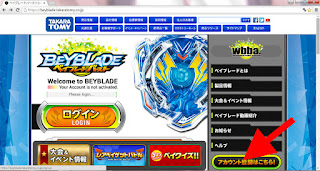
1) Type "https://beyblade.takaratomy.co.jp/" in your internet browser window.

2) At the main page, Click on the Sign Up Account Button at the bottom right corner.


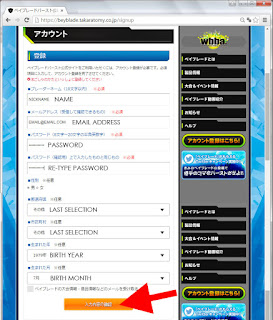
3) Enter a unique Nickname, Email, Password, Birth Year and Month as follows in the image below. After Click the yellow button at the end of the page. *Please Make Sure you enter a working email as a confirmation code will be sent to you shortly*

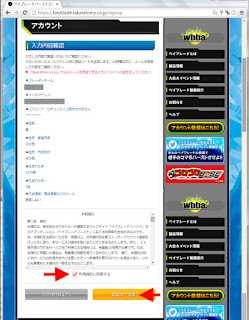
4) Reconfirm your details and Check the Agreement check box. 
After Click the yellow "Send Confirmation Code" button at the end of the page.

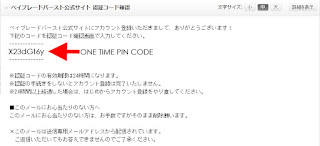
5) Open another window, and check your entered Email.
You should find an email with the One Time Pin Code.


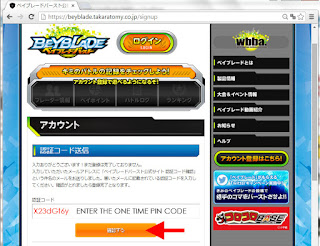
6) Enter the One Time Pin Code in the website and Click on the yellow button below.

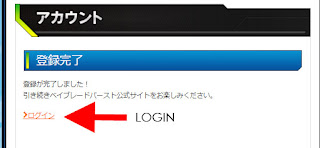
7) Sign Up is Complete. Click Login to proceed.

8) Enter your Email Address and Password. Click the Login Button at the Bottom. .

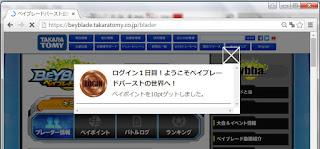
8) If this is your first Login, you will receive a Bronze Login Token.
Tokens and Trophies earns you points and rankings in the future.

Next Post, Checking out the Profile in your Account!

3,2,1! Go... SHOOT!

Thursday, November 5, 2015

Beyblade Burst! B-01 Valkyrie Wing Accel DX Starter Review

Greetings fellow Beyblader peeps!
Finally got down to getting our hands on some Beyblades from the latest upcoming series Beyblade Burst! Let start the blog rolling with...

 B-01 Valkyrie Wing Accel DX Starter set!


Layout of Contents:

01 x Layer: Valkyrie
01 x Disk: Wing
01 x Driver: Accel
01 x BeyLogger
01 x BeyLauncher Light
01 x BeyWinder (Normal)
Instruction Manuals
Stickers


Layer: Valkyrie

Motif: Warrior Valkyrie
Point: 3 Heavy Attack Blades that boost Impact against opponents Beyblade. Chance of Burst Finish is higher! The Poly-carbonate Structure is strong against Impact.

Weight: 7.99 grams

The Valkyrie Layer has an approximate Span Diameter of 45.2mm (4.5cm) 


Under part of the Layer is an equally spread balance ring of PVC plastic. Held to the PC Outer Layer by three screws on each of the 3 Blades. Locking Tabs in the center area is Standard. *Do note that Locking Tabs wear out over time, so do check the Lock Tabs condition prior to any BeyBattle to avoid Sudden Burst Finishes!*


Valkyrie is a very consistent Layer  to use for Attack Bey setups as it has an Equilateral Triangular shape and also an Attack and Parry System. The Red portion is the Attack Blades. Functions as a singular impact hammer when in contact with an opponents Beyblade. The Green portion is the Parry fins. Its sloped in an angle and pointed outwards. This design functions as a defense shield to Bounce off any direct Attacks.

Disk: Wing

Motif: Wings


Weight: 19.35 grams


Diameter: 39mm (3.9cm)
Wing is a Bladed weight disk that has 4 Wings and 2 heavier weight points.
Note the 'W' initials marked on the weight points.


The Wings are slightly angled and this design gives it Upper Force Attack properties . Though the effectiveness of such a gimmick seems redundant as the Disk is hidden under the Valkyrie Layer. Probably the effect of assisting in Attacks from low angles is possible when the Bey is circling in the outer higher level.

Driver: Accel

The Driver is a singular unit that consist of the Burst Module, the Height Unit and the Bottom Unit. Accel is basically a H145F. Which is a Height 145 and a Flat Bottom combination in the previous Metalfight Series. The new thing is the Burst Module which is 'Tamper Proof' (Does not have screws). This Module is a spring loaded lock system which keeps your Beyblade Layer and Disk together. In short, Lock comes loose, You Lose.


The Driver Bottom (Left) is similar to the Previous Flat (F) Bottom Unit (Right) and have pretty much the same properties. But that being said, if the Bottom is wear out overtime or in battle, you would need to replace the Whole Driver Unit.


Weight: 5.64 grams

Putting your Bey together.
With the new Burst Module in this new Bey, putting the Bey together might seem a little tricky at first. Here's how to do it.

First, align the Driver Tabs parallel to the Disk Fixtures as the Image.

If done correctly, the Disk should be able to be pressed down into the Driver Burst Module Unit.

This step is slightly difficult, align the Driver support tab (The white ring with a line on it, marked Red here) And also the Layer center tabs like the Image shown.

Push down the Layer onto the Driver, pressing down the Disk. Once in place turn the Layer to the Right and a Click should be felt. Turn right until you see the Metal Tab on the Disk in the 3 position. 

The Bey is Ready.

Performance: Normal Attack Stadium
Using a Black Standard BeyStadium for this demo for easy visualization purpose only. (Please use proper Battle BeyStadium for Burst series during BeyBattles to avoid any injury!)

Launched at a Parallel angle to the Ground, the Valkyrie Wing Accel moves relatively fast in the Outer ring of the BeyStadium, circling lower as it loses its revolution ratio.


Near the Center, the Bey concentrates in small circles in a 'Flower' pattern before it loses it force and stops. TIP: To start with a 'Flower' attack pattern, shoot at an angle Parallel to the BeyStadium Surface.

BeyBattle Trials: Valkrie Wing Accel vs. Valkrie Wing Accel


Trial #1: 
Both launched at the same time Parallel to the Ground. After circling for one round, The Blue Valkyrie caught up with the Red and with a Strong Impact send it Stadium Out!

Trial #2: 
Both were launched at an angle Parallel to the BeyStadium. Impact started in the center of the BeyStadium and several Impacts were made. At the 4th Impact, The Red Valkyrie Burst Finish the Blue Valkrie! Super fast battle due to the overwhelming Attack Power of the Valkyrie Layer!

Summary:

B-01 Valkyrie Wing Accel is a high Attack Beyblade with a relatively constant Burst capability due to its strong Impact Attacks. Possibility of Self Stadium Out is quite High. Bladers will need to master the Launching Technique to take full advantage of this Powerful Bey! A easy 10/10 Must have for Attack Type BeyBladers~

How to Use the BeyLogger, BeyApplication and Signing Up in Next Post~!

3,2,1! Go... SHOOT!

Monday, May 25, 2015

Beyblade Burst Videos

As more and more info of the new upcoming Beyblade Burst hits Japan. Here are a couple of the exciting video scoops found so far~
Vid from MAiDiGiTV How to play~

Another Vid from MAiDiGiTV of a live BeyBattle!

I think most Bladers out there probably are feeling skeptical about this new Beyblade Burst. Yes! Its a New way to win besides the Stadium Out and Spin Out. But like in the first vid, a fatal drop from a mis-launch or power smash slide will send Both Beyblades Bursting before any action can be experienced. I would want to have some action at least before my bey burst na if not you will see everyone using a Stamina type.

So yeah, going to reserve a benefit of a doubt before i get my hands on the real thing. And let this new Beyblade Burst prove that its a totally new experience of playing~!

Sunday, May 17, 2015

KDX Heavy Metal Weight Set

 
Finding it a notch more difficult with trying to get that cup trick? Or find it impossible to do the Lighthouse with your KDX? What you need is the Kendama Xross Heavy Metal Weight trick up set!


The KDX Heavy Metal Weight set is a Trick comes parts to enhance the overall performance of your KDX.
Set includes 3 Metal Weights (Red,Blue and Black) and 3 Enlarged Cups (xLarge, xSmall and xMiddle)


Though the KDX has quite standard Cup sizes as a normal Wood Kendama, the Plactic material makes it that little more tricky to do smooth cup tricks. Besides using the Rubber cups that come with the KDX-R, players can switch to the Bigger Cup that comes with this set. (also comes with most basic KDX sets)


After fitting the Bigger Cups, the Kendama is significantly bigger in size overall.


And makes catching the 'tama' that much easier!


The Metal Weights fit snugly in the Cups (Standard also compatible) and increases Stability and Balance for Lighthouses and Lunar tricks overall. 

Overall the KDX Heavy Metal Weight Set is a great addition not only to players who is starting on Kendama but also enhancing the weight balance of your KDX 'ken'. A 9/10 must get for KDX players~

Thursday, May 14, 2015

Introducing Naru~ (Lil'Fairy x Paradox hybrid)

 
Peeps whom are familiar with Azone line of Dolls should be no stranger to the name Lil'Fairy. This series of Dolls not more than 12cm in height has bigger hands and feet when compared to its cousin 1/12 Picco Neemo Dolls.

During my Japan trip in April 15' we were unable to get our hands on a Lil'Fairy as the maid outfit series that we wanted were highly popular. So after scouting around, mi decided it was worth a try to 'create' my very own version of it.


Of course by 'creating' means making a hybrid. Using the current easily available Azone Lil' Fairy body (1780yen), combining it with Paradox's Neko/Usako Head (1340yen aft discount) and with Wig (1200yen aft discount) and basic Clothes (1000yen), shoes (1000yen). Naru was born~!!!! (Named her for easy reference lol)


Naru has a 11.5cm Head Circumference, a 20% bigger head when compared to the Lil'Fairy making her more SD looking. But i guess the Bigger head makes her big hands and feet more proportionate?


The Azone Lil'Fairy body can pose perfectly even with the bigger head size. At only 3120yen for a Basic Doll and another 3200yen for accessories. This Complete Hybid cost around SGD70 and is easily affordable for anyone who wants a Lil'Fairy hybrid. But if you are a Azone Lil'Fairy fanatic, no issues with the original future releases ya~


But for now its Naru~chan for me, Yoroshiku naru~!
(Naru showing off her Kendama tricks to Lipu~)